

Last Updated: October 23, 2026
Quick Summary
To match online apparel colors, calibrate your screen first by turning off Night Shift and blue-light filters, setting brightness to roughly 50-70%, and viewing every listing on the same device. Then compare multiple photos, check fabric and finish, and order a swatch when the color is critical.
- Turn off Night Shift, True Tone, and blue-light filters before comparing any two listings.
- Set screen brightness to roughly 50-70% to avoid muddy mid-tones and blown-out light shades.
- A swatch card removes every screen variable at once and beats any on-screen color tool.
- Pair a smooth fabric with a textured one only if you want a visible tonal difference.
- Build outfits on two neutrals plus one accent for contrast without a clash.
Table of Contents
- Why Online Apparel Colors Look Different Than in Person
- Color Theory for Clothing: The Basics That Actually Help
- How to Match Online Apparel Colors Step by Step
- Best Color Matching Apps for Fashion
- How to Match Tops, Bottoms, Jackets, and Accessories
- How to Wash Graphic Tees to Keep Colors True
- Color Accessibility and Skin Undertones
- Frequently Asked Questions
Why Online Apparel Colors Look Different Than in Person
Learning how to match online apparel colors starts with one hard truth: the color on your screen is not the color in the box.
At Unique Designs, we have spent nearly four decades printing apparel, and we still tell customers to expect small differences between screen and shirt. That is how digital color works, not a flaw in the listing.
Screen Settings, Lighting, and Photo Editing
Your monitor decides how colors look before the product photo even matters. A phone in bright sun and a laptop at night show the same navy tee as two different blues.
Three things change what you see:
- Display mode: Night Shift and blue-light filters warm up every color on screen.
- Brightness: A dim screen makes dark tones look muddy and light shades look gray.
- Room lighting: Warm bulbs push colors toward yellow; cool bulbs push them toward blue.
Photo editing adds another layer. Retailers adjust contrast and saturation to make listings pop, so a soft sage green can read as bright mint online.
Fabric, Finish, and Garment Construction Effects
Fabric changes color more than most shoppers expect. The same dye looks different on cotton, polyester, and blends because each fiber reflects light differently.
Finish matters too. Brushed fleece absorbs light and looks deeper; smooth cotton jersey reflects more and looks brighter. Heathered fabrics blend two tones, so the color shifts as you move.
Color Theory for Clothing: The Basics That Actually Help
Color theory for clothing is the practice of using the color wheel to build outfits that look intentional. You do not need an art degree. You need three ideas: complementary, analogous, and monochromatic.
The Color Wheel, Complementary, and Analogous Schemes
The color wheel is a circle of hues arranged by their relationship to each other. Two schemes do most of the work for everyday outfits.
- Complementary colors sit opposite each other, like blue and orange. They create strong contrast and make each color look brighter.
- Analogous colors sit next to each other, like navy, teal, and forest green. They create a calm, blended look.
Complementary pairings suit statement pieces. Analogous pairings suit layered outfits where you want harmony, not a clash.
Monochromatic and Tonal Palettes
A monochromatic palette uses one hue in different shades, light gray trousers, a charcoal sweater, black boots. It looks polished and is almost impossible to get wrong.
A tonal palette is the softer cousin, mixing close shades from the same family like beige, cream, and sand. The contrast is subtle, so texture does the talking.
How to Match Online Apparel Colors Step by Step
Here is the workflow we recommend to customers before they buy. It takes about ten minutes and saves a lot of returns.
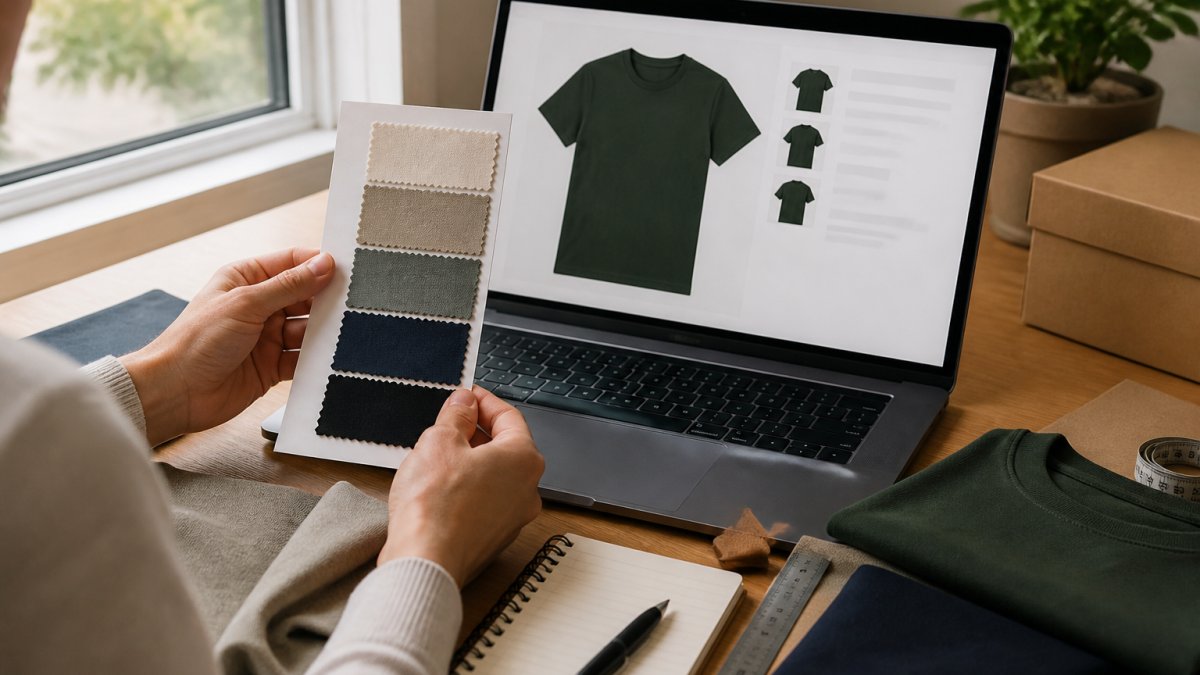
Step 1: Calibrate Your Screen Before You Judge Any Color
Most shoppers skip this, and it is the single biggest source of bad online color decisions. Before comparing two listings, neutralize your display:
- Turn off Night Shift, True Tone, and blue-light filters. These warm the entire screen and push blues toward gray and whites toward yellow.
- Set brightness to roughly 50-70%. A dim screen muddies mid-tones; a maxed-out screen blows out light shades.
- Sit away from direct sun and warm lamps. Neutral daylight or a cool-white room light gives the most honest read.
For a sanity check, pull up a plain white web page. If the white looks cream or blue, your display is tinting everything you see.
Step 2: Order Swatches or Check the Color Matcher
Start with physical color when you can. Many apparel sellers offer swatch cards or fabric samples for a small fee, some credited back on your first order. A swatch removes every screen variable at once, which is why it beats any on-screen tool.
If swatches are not available, look for a color matcher tool on the product page.
Step 3: Compare Listings Across Retailers
Open two or three tabs and compare the same color name across stores. A "heather gray" at one shop can be lighter or darker than at another. Color names are marketing, not standards, so compare the images, not the words.
Watch for these signals:
- Multiple photos: Listings with flat lays, on-body shots, and close-ups give you more color data.
- Color names: Descriptive names like "washed olive" tell you more than "green."
- Customer photos: Real-world shots show the color under normal light.
Step 4: Read the Fabric and Finish, Not Just the Swatch
The same nominal color behaves differently by material, and this is where most online matching goes wrong. Before you commit, check the description for fiber and finish:
- Cotton jersey reflects light evenly and reads close to its true dye color.
- Heathered knits blend two or more tones, so the color shifts as the fabric moves and can look lighter or grayer than the flat swatch.
- Denim fades and varies by wash, so two "indigo" pieces can sit several shades apart.
A practical rule: pairing a smooth fabric with a textured one will show a visible tonal difference even when color names match. Lean into it with a tonal palette rather than fighting it.
Step 5: Balance Neutrals, Accents, and Contrast
Neutrals are your base: black, white, beige, gray, and navy. Accent colors are the pop: red, mustard, teal, or rust.
A simple rule keeps outfits balanced: two neutrals and one accent. That ratio gives you contrast without a clash, whether you are matching a graphic tee to jeans or a sweatshirt to joggers.
| Outfit Goal | Palette Type | Example Combination | Why It Works |
|---|---|---|---|
| Everyday casual | Neutral + accent | Gray tee, black jeans, red cap | One pop of color against calm base |
| Polished layered look | Monochromatic | Cream tee, beige jacket, tan boots | Same hue, different shades |
| Bold statement | Complementary | Navy tee, orange overshirt | Opposite hues boost contrast |
| Soft and subtle | Tonal | Sage tee, olive jacket, stone chinos | Close shades, texture carries it |
Step 6: Run a Final Pre-Order Checklist
Before you check out, run this quick pass to catch most mistakes that lead to returns:
- Did I view every listing on the same, calibrated screen?
- Did I look at at least one non-studio photo or customer image?
- Do the fiber and finish of the two items differ in a way that will shift the color?
- Is the outfit built on two neutrals plus one accent, or a deliberate tonal scheme?
- If the color is critical, can I order a swatch or confirm the return policy first?
If you can answer yes to those, you have done more color verification than most online shoppers.
Best Color Matching Apps for Fashion
Color matching apps for fashion help you sample a color from a photo and find close matches. They are useful for building a palette from a shirt you already own, but only if you understand their limits. Most apps read pixels, not fabric, so the output is a starting point, not a verdict.
What These Apps Actually Do
Most color picker and palette apps follow the same basic loop:
- You upload or shoot a photo.
- You tap a spot on the image to sample it.
- The app returns a hex code (a six-character color value like #1F3A5F) plus similar shades, and often suggests complementary or analogous pairings.
Some apps add a color wheel overlay, a palette library, or a "match to nearest named color" feature. Those extras are handy for organizing a wardrobe palette, but they do not correct for the camera or the screen.
A Repeatable Sampling Method
If you are going to use an app, use it the same way every time so your results are comparable:
- Photograph the garment in indirect daylight, not under a lamp and not in direct sun. Overcast daylight is the most neutral light most people have access to.
- Fill the frame with fabric. Avoid including skin, background, or shadows, which pull the sample off-color.
- Sample three to five spots across the garment, a highlight area, a mid-tone, and a shadowed fold, and average them mentally rather than trusting a single tap.
- Record the hex codes in a note alongside the garment name, so your next order has a reference point.
- Re-shoot the same garment on a different day and compare. If the hex codes drift widely, your lighting or camera is the variable, not the fabric.
Where Apps Fall Short
Apps are weakest at exactly the task online shoppers need most: predicting how a garment you have not seen in person will look next to something you already own. Three limits matter:
- Camera color shift. Phone cameras apply automatic white balance and saturation, so the same shirt can sample differently in two photos.
- Screen rendering. The hex code is accurate to the image file, but your display still tints what you see.
- Fabric blindness. A hex code cannot capture sheen, heathered blends, or texture, which are often what make two same-color items look mismatched in person.
A Better Use: Build a Wardrobe Color File
The highest-value use of a color app is not matching a single purchase, it is building a personal color file. Photograph your most-worn pieces in daylight, sample each one, and save the hex codes with the item name and fabric. Over time you get a reference library you can check against any new listing.
How to Match Tops, Bottoms, Jackets, and Accessories
Matching a full outfit comes down to contrast and repetition. Repeat one color twice, then let the rest of the outfit support it.
Start with the anchor piece. If your graphic tee is the focus, pull one color from the print and repeat it in your accessories.
Then build outward:
- Tops and bottoms: Pair light with dark for contrast, or keep both in the same family for a tonal look.
- Jackets: Let the jacket add the third color. A denim jacket over a white tee and black jeans keeps the palette tight.
- Accessories: Use one accent, not three. A cap, a bag, or a belt is enough.
For Christian-themed and seasonal graphic apparel, this method keeps the message front and center.
How to Wash Graphic Tees to Keep Colors True
Washing is where good color goes to die. A few habits keep colors true for years.
Follow these steps:
- Turn the shirt inside out before washing to protect the print from friction.
- Wash cold on a gentle cycle. Hot water breaks down dyes faster.
- Use mild detergent and skip bleach and fabric softener, which can break down print inks.
- Skip the dryer or use low heat. Air drying flat preserves both color and fit.
- Wash dark colors together to limit dye transfer from lighter garments.
According to care guidance from the American Cleaning Institute, sorting by color and using cooler water settings are two of the simplest ways to protect fabrics.
Unique Designs prints on premium heavyweight cotton, and true color is a core part of how we build each design.
Color Accessibility and Skin Undertones
Two shoppers can look at the same shirt and see different colors. Color vision differences affect a meaningful share of people, so contrast matters as much as hue.
Warm and cool undertones also change how a color reads against skin. Warm undertones tend to suit earth tones like rust, olive, and cream.
This is a guide, not a rule.
The color and contrast guidance from the Web Content Accessibility Guidelines is a useful reminder that strong contrast helps everyone, not just people with color vision differences.
Frequently Asked Questions
Is there an app that can match colors in clothes?
Yes. Color-matching apps for fashion let you photograph a garment or fabric swatch and get a digital color reading you can compare against online listings. They help most when you use consistent lighting and photograph against a neutral background. Pair the app with a physical swatch whenever possible, since screens and cameras still shift colors. For graphic tees and custom apparel, ask the seller whether they offer swatches before you commit to a large order.
How do I color match clothes online without seeing them in person?
Start by checking whether the retailer offers physical swatches or a color matcher tool. Compare the same product across multiple product pages and look for photos taken in natural light. Read reviews that mention color accuracy. When you match online apparel colors, factor in fabric and finish, since a heavyweight cotton tee will read differently than a polyester blend. If the seller cannot confirm true colors, order one item first before buying a full set.
What is the 3-3-3 rule for clothing?
The 3-3-3 rule is a simple styling guideline: keep outfits to about three colors, three textures, and three pieces of visual interest. It helps you avoid clashing without overthinking. In practice, pick one dominant color, one neutral, and one accent, then let fabric and fit carry the rest. It works well for graphic tees, where the print already adds visual noise, so limiting the surrounding palette keeps the design readable and the outfit balanced.
Can I use a color wheel to match my graphic tees?
Yes. A color wheel helps you choose complementary colors (opposite on the wheel) for contrast or analogous colors (next to each other) for a softer look. For graphic tees, pull one color from the print and repeat it in your bottoms or accessories. That keeps the outfit tied together. If the print is busy, anchor it with neutral colors like beige, white, or black so the design stays the focus.
Matching apparel colors online takes a little patience, and the payoff is fewer returns and a wardrobe that actually works together. If you want graphic tees and sweatshirts where the printed color matches the photo, shop the Unique Designs collection. Our team has spent nearly forty years getting color right, from crisp line work to true-to-life shades on premium heavyweight cotton. Get started with Unique Designs and order with confidence.

